
Add Any Device
to Apple HomeKit
AFFORDABLE BRIDGES FOR HOMEKIT INTEGRATIONS.
Buy one of the best and the simplest solutions to add any device to Apple HomeKit with ease!
Trusted by 10,000+ Users
Control via
Apple Home
Security
100% Local

1000+
Compatible Devices
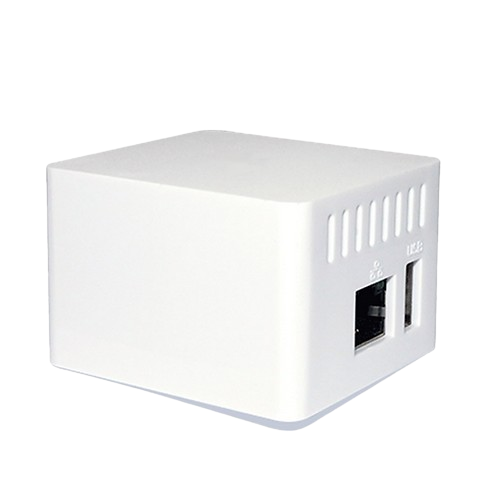
HomeKit Homebridge Server
Our most popular HomeKit Bridge features a sleek design, connecting over 2000 accessories. It is the easy-to-use, secure, and most affordable way to integrate smart home devices that do not natively support HomeKit.
With ATH Bridge, you can stay on track with help from Siri and control your smart home devices directly from the Apple Home App.
Easy Setup
Plug and play installation with pre-flashed software.
Privacy First
Runs locally. No data collection or external clouds.
Affordable
Connect all devices without buying expensive new hubs.
Universal
Supports Nest, Ring, TP-Link, and hundreds more.
Why Choose ATHBridge?
The ultimate solution to unify your smart home.
Seamless Integrations
Add any smart device to HomeKit with the ATH Bridge. Connect over 2000 accessories easily.
Fast Delivery
You can expect a fast and safe delivery right to your front doorstep.
Help Center
Round-the-clock assistance for a smooth shopping and setup experience.
Secure Online Payment
Pay with world’s most popular and secure payment methods.
Secure & Local
Runs locally on your network. Your data stays private and never leaves your home.
User Friendly
Simple interface to manage your plugins and devices. Designed to be plug-and-play.
How it Works
Get up and running in minutes with our simple setup process.
1. Insert SD Card
Remove the pre-flashed SD card from the packaging and place it inside the server.
2. Connect & Power
Connect the server to your router using the cord, then turn it on.
3. Find IP
Use your router settings or a scanning tool to find the server's IP address.
4. Access Dashboard
Enter the IP address and port 8581 in your browser (e.g. http://192.168.1.10:8581).
5. Login
Log in using the default credentials: username 'admin' and password 'admin'.
6. Install Plugins
Select and download the specific plugins you need to configure your devices.
Who is ATHBridge for?
Perfect for smart home enthusiasts who have a mix of devices from different brands but want a single, unified control interface: Apple HomeKit.
Smart Cameras
View Ring or Arlo feeds in Apple Home.
Thermostats
Control Nest thermostat with Siri.
Lighting
Sync TP-Link bulbs with HomeKit scenes.
Speakers
Manage Sonos audio via Home app.
Supported Brands
Compatible with virtually any smart home device that has a Homebridge plugin.
Frequently Asked Questions
Common questions about the ATH Bridge.
Latest from Our Blog
Tips, guides, and insights to help you get the most out of your smart home
Ready to Upgrade Your Smart Home?
Join thousands of users who have unified their smart home experience with ATH Bridge.